Your desk is low-key the most important “room” you own. It’s where work happens, games happen, doomscrolling happens… basically, your entire digital life runs through that rectangle of wood and cables.
But most people treat their setup like furniture, not like something they can upgrade. Today we’re fixing that.
Let’s walk through a handful of clever, very real gadgets that can turn a regular desk into a place you actually want to sit at—whether you’re working, gaming, or just pretending to do either.
Point 1: Monitors Aren’t the Only Screens That Matter
Most of us obsess over monitor specs and then ignore everything around them. But “around” the screen is where comfort lives.
A few small gadgets can totally change how your setup feels:
- Monitor light bars: These sit on top of your display and shine light down onto your desk instead of into your eyes. They cut glare, make text easier to read, and keep your keyboard visible at night without blasting your face.
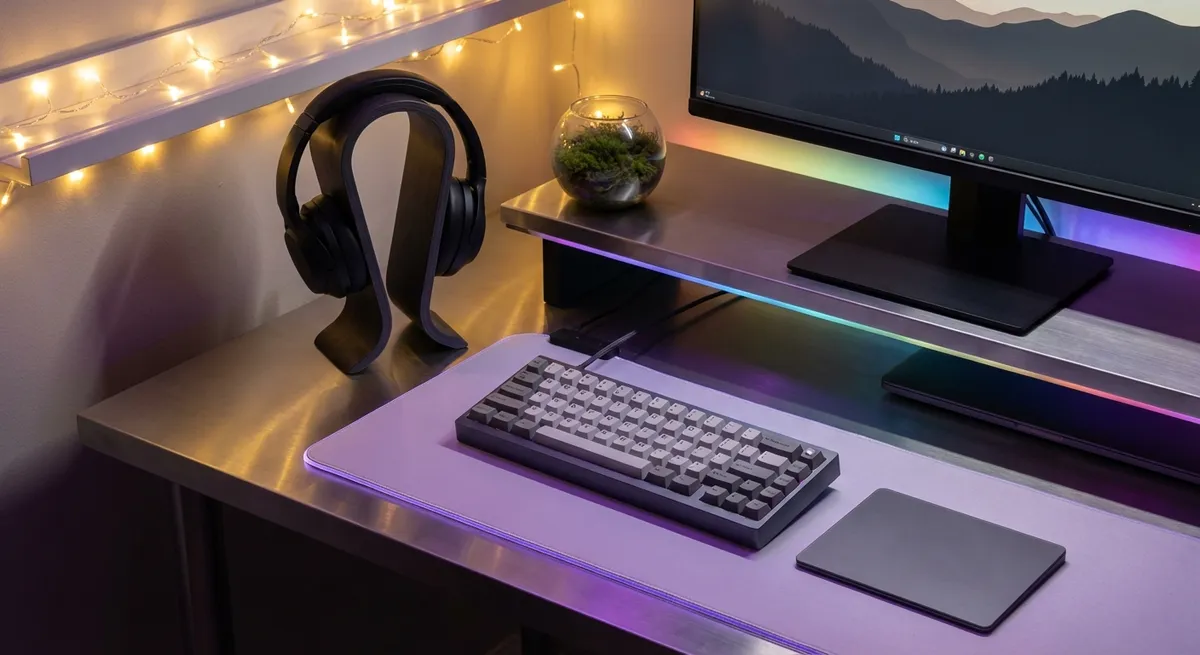
- Bias lighting (LED strips behind your monitor): This makes the screen feel easier on your eyes and can actually make colors look better. Movies and games feel less like “staring at a rectangle” and more like a mini home theater.
- Portable secondary displays: Thin, USB-C-powered screens that you can drag around your desk, rotate vertical for chat or code, or tuck away when you need space. No mounts, no drama.
What’s cool here isn’t power or specs—it’s comfort. These are small, mostly invisible gadgets that change how long you can sit at your desk before your eyes and brain tap out.
Point 2: Quiet Keyboards and Mice Are a Whole Personality
Mechanical keyboards get all the hype, but the real glow-up is picking gear that matches your vibe: loud and clicky, or whisper-quiet and classy.
Some interesting directions desk gadgets are going right now:
- Low-profile mechanical keyboards: You get the feel and responsiveness people love, but in a slimmer, more laptop-like form that’s easier on your wrists.
- Customizable keymaps: Many modern keyboards let you remap keys in software or even on the board itself. One key can open your streaming app, start a macro, or mute your mic instantly.
- Silent switches and dampened keys: Great if you share a space, stream late at night, or work in an office and don’t want to sound like you’re rage-typing a novel.
- Vertical or ergonomic mice: They look weird, but they help keep your wrist in a more natural position. After a week, going back to a flat mouse feels like a downgrade.
The interesting part: these aren’t “gamer-only” upgrades anymore. Productivity-focused brands and even office suppliers are borrowing gamer ideas—like programmable buttons and custom lighting—and blending them into everyday gear that don’t scream RGB dragon headset energy.
Point 3: Little Desk Hubs Are Quietly Becoming Command Centers
The least glamorous gadget on your desk might be doing the most work.
Docking stations and USB-C hubs are turning laptops into desktop-class rigs without you needing a giant tower PC. One cable to your laptop, and suddenly you’ve got:
- Extra monitors
- Wired internet
- Fast storage
- Mic, webcam, speakers
- Charging for your phone and other gadgets
The interesting shift: hubs are getting smarter, not just bigger.
- Some docks now prioritize power and bandwidth automatically, so your main display and storage don’t slow down when you plug in extra gear.
- Others include built-in SSD slots, letting you drop in storage like Lego instead of juggling random portable drives.
- Travel-size hubs can now run dual 4K monitors from a thin-and-light laptop—something that used to need a chunky workstation.
If you’re constantly plugging and unplugging cables, a good dock turns your whole desk into one single “on/off” switch. Sit down, plug in one cable, everything wakes up. Stand up, unplug, and your laptop walks out with you like nothing happened.
Point 4: Smart Lighting Is Basically Mood Control for Your Desk
Smart lights aren’t just a “fun RGB thing”—they’re a productivity hack hiding inside a gamer aesthetic.
A few interesting things desk lighting can do now:
- Match your screen: Bias lights and some smart bulbs can sync colors with what’s on your monitor. Explosions, sunsets, and neon signs spill onto your wall for a low-budget immersive setup.
- Shift color temperature through the day: Warm light towards evening, cooler white earlier in the day. That can help your brain tell “work time” from “wind-down time” even if you never leave your desk.
- Scene-based lighting: One tap or voice command for “Work Mode” (bright, neutral white), “Meeting Mode” (balanced, clean lighting for your webcam), or “Chill Mode” (dim, warm tones).
The small-but-fascinating part: lighting has become software-aware. Your lights can tie into your calendar, your PC, or your smart speaker. You can literally walk in, say “Start focus session,” and have your lights and devices shift into a preset routine.
Does it replace actual discipline? No. Does it make starting work slightly less painful? Weirdly, yes.
Point 5: Charging Gear Is Finally Catching Up to How Many Gadgets We Own
We’re way past the era of one cable and one charger. Your desk probably has:
- Phone
- Wireless earbuds or headphones
- Maybe a smartwatch
- Game controller
- Tablet or e-reader
- Random accessory or two
Instead of the usual cable spaghetti, newer charging gadgets try to clean the chaos:
- Multi-device wireless chargers: One pad or stand that handles your phone, watch, and earbuds at once. Some are magnet-based so your phone locks into place, which is better than guessing the “sweet spot” every time.
- GaN chargers: These use a different kind of material (gallium nitride) to shrink down big power into small bricks. One little charger can now power a laptop, phone, and tablet at the same time from your desk hub.
- Under-desk power strips and cable channels: Not exactly glamorous, but they hide the ugly parts and keep everything reachable. The interesting bit is how many are now being sold with USB-C and smart switches built in.
The trend: power is moving closer to where you actually use things. Instead of that sad, overstuffed power strip on the floor, your desk can have clean, built-in charging, with cables that don’t look like they’re trying to escape.
Conclusion
A “good” desk setup isn’t about how expensive your gear is—it’s how invisible the friction feels.
When your light doesn’t fight your eyes, your keyboard feels right, your laptop becomes a full rig with one cable, your lighting matches your mood, and everything actually stays charged, your desk stops being just a flat surface and starts acting like a tool.
If you’re looking for your next upgrade and don’t want to just buy another shiny screen, look around the edges of your setup. The best gadgets might be the ones that don’t try to steal the spotlight—but quietly make everything better.
Sources
- [Harvard Health: Blue light has a dark side](https://www.health.harvard.edu/staying-healthy/blue-light-has-a-dark-side) - Explains how different types of light affect eye strain and sleep, relevant for monitor lights and smart lighting.
- [BenQ ScreenBar Product Page](https://www.benq.com/en-us/lighting/screenbar-monitor-light-screenbar.html) - Example of a monitor light bar and how it reduces glare and improves desk lighting.
- [Dell: What is a Docking Station?](https://www.dell.com/en-us/blog/what-is-a-docking-station/) - Overview of how docks and hubs expand laptop connectivity for multi-monitor and accessory setups.
- [Microsoft Ergonomics Guidance](https://www.microsoft.com/en-us/worklab/ergonomics) - General advice on ergonomic accessories like keyboards and mice and how they impact comfort.
- [US Department of Energy: Energy Saver – LED Lighting](https://www.energy.gov/energysaver/led-lighting) - Background on LED lighting efficiency and benefits, useful context for smart and bias lighting choices.
Key Takeaway
The most important thing to remember from this article is that this information can change how you think about Gadgets.